15.0 - Last modified on 2024-10-04 Revised by Martin Klubeck
14.0 - Last modified on 2022-02-04 Revised by Denise Moser
13.0 - Last modified on 2022-02-04 Revised by Justin Howell
12.0 - Last modified on 2021-07-30 Revised by Matthew McGuire
11.0 - Last modified on 2021-07-13 Revised by Denise Moser
10.0 - Last modified on 2020-07-13 Revised by Kael Kanczuzewski
9.0 - Last modified on 2020-07-10 Revised by Kael Kanczuzewski
8.0 - Last modified on 2020-07-07 Revised by Jean Pawlak
7.0 - Last modified on 2020-07-07 Revised by Michelle Johnson
6.0 - Last modified on 2020-06-16 Revised by Matthew McGuire
5.0 - Last modified on 2020-06-04 Revised by Justin Howell
4.0 - Last modified on 2020-05-26 Revised by Michael Ball
1.0 - Created on 2016-09-08 Authored by Michael Ball
Question: How do updates work with the Zoom client application for Windows/Mac?
Context: Zoom desktop applications on Windows or Mac.
Answer: Zoom automatically requires an update to the local clients for Mac and PC when there are security or critical fixes. These updates run when the application starts and by default, the application starts when the local machine is started. This is true of the standard install and the managed install (.msi).
For less critical updates, updates are manual.
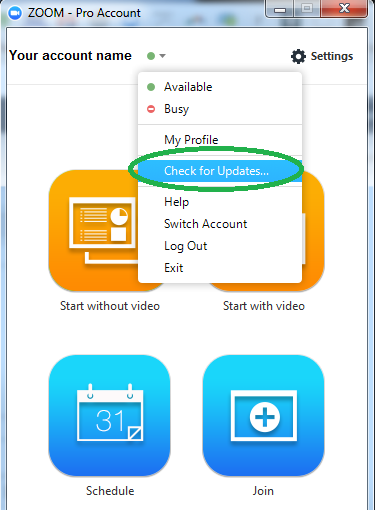
To trigger the update process from the Zoom client:
- Open the local client
- Click on the green dot next to your name
- Select Check for Updates